



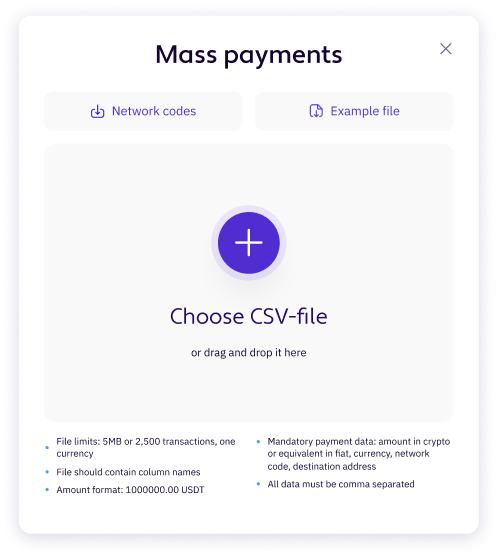
CSV only. Comma or semicolon separator. First row must contain column names. Mandatory columns: Currency, Address, Amount (and Network where applicable). Max file size 5 MB.

Search
For example: Bitcoin, Calendar, EURUSD
Didn't find what you were looking for? Contact our Customer Support

Run hundreds of crypto payouts as one operation.
Upload a CSV, confirm once, and track every transaction by Batch ID. One on-chain transaction replaces hundreds of network fees on UTXO networks like Bitcoin.

See how it works.
Watch this short video walkthrough of the full Mass Payment flow, from CSV upload to transaction history.
One file. One operation. Full traceability.
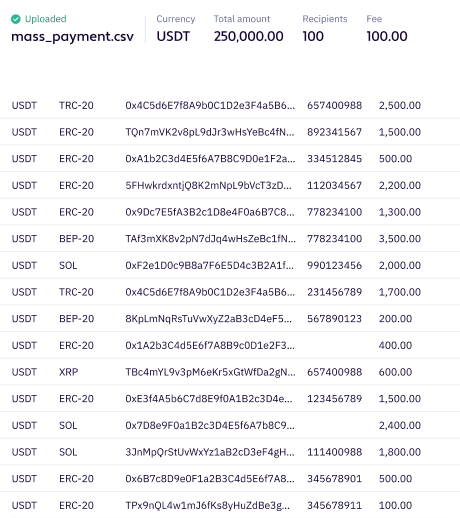
Each upload runs as one business operation. Every transaction shares the same Batch ID.

Why teams use it

Cut network fees on Bitcoin
On UTXO networks the batch goes out as one multi-destination transaction. The more recipients, the bigger the saving.

Reduce processing time
One CSV replaces hundreds of manual withdrawals. One Batch ID stitches every transaction for reconciliation.
Stay in control of every batch
Mandatory 2FA. Whole-batch decisions, no partial payouts. Optional source-currency conversion at batch level.
Supported networks
Asset / network
 btc
btc ltc
ltc bch
bch bsv
bsv dash
dash zec
zec ada
ada eth
eth sol
solStablecoins (USDT,USDC) on ERC20 / TRC20 / SPL
 usdt
usdt usdc
usdcMass Payment
Live
Engine ready
Live
Live
Fee batching
Yes — multi-destination
Once enabled per asset
Not applicable
Not applicable
Network-fee batching means sending one on-chain transaction for many recipients. Applies only to UTXO networks. Account-based networks remain one transaction per row.
FAQ
-
 What file format do you accept?
 - Can one file pay out in multiple currencies? No. One payout currency per file. The source-currency conversion field lets you debit a different currency, but the payout currency is fixed for the batch.
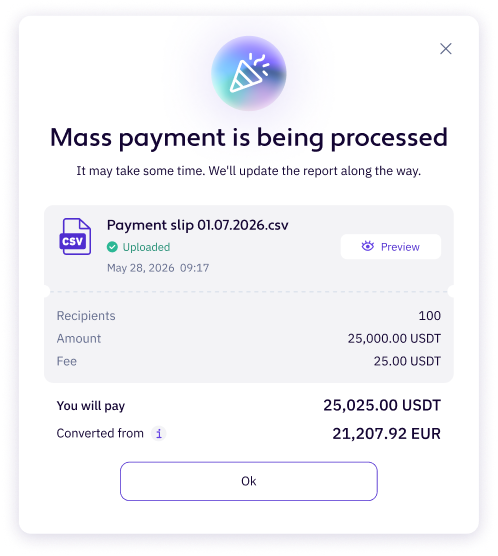
- How are network fees charged? Withdrawal fees are charged on top of the amount in the CSV. Recipients receive the full CSV amount; your wallet is debited the amount plus the fee. On UTXO networks with batching, the fee is calculated per batch and shown as a single line on the first row in transaction history. On account-based networks, each row carries its own fee.
- Can two people work on the same batch? Yes. Save as draft after upload and preview; another user with the right role reviews and confirms with MFA. Approver and Preparer can be different people.
- What happens if a row has an error? Validation runs in order — file structure, row symbols, currency, network, minimums, balance and limits. If a step fails, processing stops and you see the failed step. Once a batch is processed, the results report shows per-row status.
Ready to move many payouts in one upload?

The material presented on this website is for general information purposes only and does not constitute investment advice, or a recommendation or solicitation to exchange, buy, sell, stake, or hold any cryptoasset, or to engage in any specific trading strategy. The volatile and unpredictable nature of the crypto-asset markets can result in the loss of funds. Geographic restrictions may also apply. We do not hold a licence nor are registered in the United Kingdom, and do not actively offer services to UK residents. This information is not intended for distribution to, or use by, residents of certain countries or jurisdictions, including but not limited to the United States, Iran, Russia, and others, as the Company does not offer its services in these jurisdictions. Digital assets are complex instruments that involve a high level of risk. Please ensure that you fully understand the risks before entering into any transactions.
Contact us: [email protected]
CLICKJOINT B.V., registered address at Zuikertuintjeweg Z/N (Zulkertuin Tower) Curacao.